Trading education · Demo trading
How to Use a Forex Demo Account
Set up a forex demo workspace, read quotes and contract specifications, practise an order and reconcile the result without risking real money.
In this lesson
- Set up and identify a demo workspace and its contract assumptions.
- Reconcile a hypothetical fill, result and separate commission.
Course outline
The complete course
8 modules. One clear path.
Follow the lessons in order, or return to a topic when you need it. Every lesson is open.
01Forex trading fundamentals10 lessons · Not started
Check brokers, rehearse a demo workflow, then study quotes, orders, costs, exposure and the demands of a trading day.
- Forex trading for beginnersNot studied
- How to Check a Forex Broker’s RegulationNot studied
- How to Use a Forex Demo AccountNot studied
- Forex order typesNot studied
- How to Place, Manage and Close a Forex TradeNot studied
- Spreads, slippage and swapsNot studied
- Margin and leverageNot studied
- Margin calls and stop-outsNot studied
- Day trading, swing trading and scalpingNot studied
- Forex market hoursNot studied
02Position sizing and risk management7 lessons · Not started
Connect price distances, contract assumptions and combined currency exposure to cash risk, payoff and drawdown.
- Stop-loss distances in pipsNot studied
- EUR/USD position sizingNot studied
- JPY pip valuesNot studied
- Position sizing with trading costsNot studied
- Forex Correlation and Combined Currency ExposureNot studied
- Risk-reward ratiosNot studied
- Drawdown and recoveryNot studied
03Price action and chart patterns5 lessons · Not started
Work from completed observations to candles, zones, multiple timeframes and clearly stated pattern boundaries.
- Price action tradingNot studied
- Candlestick patternsNot studied
- Support and resistanceNot studied
- Multiple Timeframe Analysis in ForexNot studied
- Chart patternsNot studied
04Trading indicators3 lessons · Not started
Study what moving averages, RSI and MACD calculate before interpreting a signal.
- Moving averages: EMA and SMANot studied
- RSI indicatorNot studied
- MACD indicatorNot studied
05Gold trading and XAU/USD4 lessons · Not started
Identify the product, translate lots into ounces and work through results and position sizing.
- Gold trading for beginnersNot studied
- Gold contract sizes and lot sizesNot studied
- Gold profit and lossNot studied
- Gold position sizingNot studied
06Economic indicators and central banks9 lessons · Not started
Read currency drivers, inflation, growth and policy announcements with their expectations and revisions.
- Central banks and currency pricesNot studied
- Nonfarm payrolls (NFP)Not studied
- CPI inflationNot studied
- PCE inflationNot studied
- GDP growth and revisionsNot studied
- PMI explainedNot studied
- Retail sales explainedNot studied
- Central bank decisionsNot studied
- FOMC meetingsNot studied
07Forex strategies and backtesting5 lessons · Not started
Define a reproducible study, audit its assumptions and work through breakout, trend and range examples.
- Forex trading strategiesNot studied
- Backtesting trading strategiesNot studied
- Breakout trading strategiesNot studied
- Trend-following strategiesNot studied
- Range trading strategiesNot studied
08Trading psychology and signals2 lessons · Not started
Review the process behind a result and the records needed to assess a performance claim.
- Trading psychologyNot studied
- Forex signals explainedNot studied
The short answer
Use a demo account to rehearse a complete process: confirm the training account, inspect the contract, prepare an order, verify its status and reconcile the result. Demo profit does not establish how you will perform with real execution and real money.
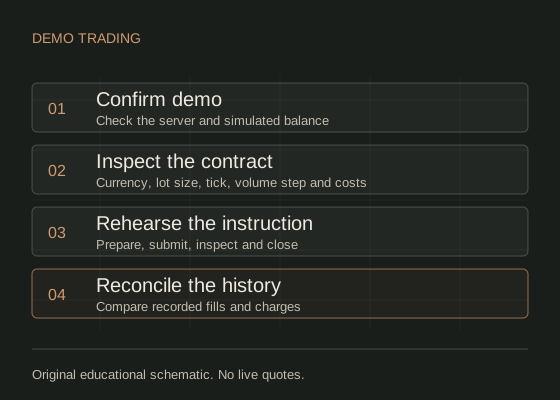
Confirm the training environment first.
Use the platform or broker’s official instructions after completing the broker identity checks. Confirm that the selected server and account are labelled demo. Check that the displayed balance is simulated before opening any order ticket. MetaTrader 5’s MetaTrader 5: opening a demo account describes choosing a server and opening a training account.
If offered a choice, use a simulated balance, account currency and leverage that make your intended exercise realistic. A huge virtual balance can hide the impact of a small absolute loss. Record these settings; changing the balance mid-exercise makes comparisons less useful.
Keep one-click trading and automated trading off while learning the controls. Do not share account passwords, install a stranger’s remote-access tool or switch to a real account to finish this exercise.
Learn four areas of the workspace.
| Area | What to locate | Check to perform |
|---|---|---|
| Quotes / watchlist | Symbol name, bid and ask | The instrument matches the intended contract, including any suffix. |
| Chart | Timeframe, price basis and timestamp | Distinguish a bid or last-price chart from an executable ask quote. |
| Trade / positions | Pending orders and open positions | A submitted instruction is not the same as an executed position. |
| History / activity | Fills, fees and closed results | The recorded fills and sizes reconcile with the calculation. |
In MetaTrader 5 these functions appear around Market Watch, charts and the Toolbox. Read the MetaTrader 5: platform workspace and getting started for platform-specific navigation. On a phone, the same tasks may sit in separate tabs. Rotate or enlarge the interface only if it helps you read the full symbol and volume.
Read the symbol specification.
Write down the base and quote currencies, contract size per lot, volume step, minimum volume, tick size, trading hours and commission convention. Confirm the account currency. Do not infer all of these from the number of decimals on the chart.
For this lesson only, assume EUR/USD, a USD account, 100,000 EUR per lot and a permitted 0.01-lot increment. Then 0.01 lot means 1,000 EUR of exposure. A 0.0001 move changes its price result by USD 0.10. Those assumptions must be checked for a real product; they are not instructions to trade it.
Margin is the required deposit for exposure, not the planned loss. A demo platform accepting a volume does not mean that volume meets your chosen risk budget.
Reconcile a small hypothetical round trip.
Assume a demo buy of 0.01 lot fills at ask 1.1002. It later closes at bid 1.1010. These are invented execution prices, not a live quote. Assume a separately charged round-trip commission of USD 0.08, with no financing or conversion charge.
| Calculation | Result |
|---|---|
| Price movement: 1.1010 − 1.1002 | 0.0008 = 8 pips |
| Price P/L: 1,000 × 0.0008 | USD 0.80 |
| Net P/L: USD 0.80 − USD 0.08 | USD 0.72 |
The bid/ask fill difference already incorporates the spread. Do not subtract the initial spread again. If a stop had been placed at 1.0992, the planned entry-to-stop distance would be 10 pips and the price loss at that exact fill would be USD 1.00, before the assumed USD 0.08 charge. The actual stop fill could differ.
Use the costs guide when your demo statement has commission, swaps or different execution prices. A difference between your estimate and history is something to explain, not erase.
Practise the full cycle.
- Confirm demo status, symbol, account currency and contract specification.
- Write down the direction, permitted volume, instruction and intended exit before submitting.
- Read the complete ticket, including any stop or target. Confirm only the planned demo instruction.
- Check the response: rejected, pending, partly filled or filled. Inspect the resulting volume.
- Use the platform’s explicit position-close control when closing. Verify that the position is closed and unused pending orders are cancelled.
- Reconcile fills, commission and other charges in history. Record one thing you would check differently next time.
Follow the order management walkthrough for the difference between cancelling an order and closing a position.
Treat the demo result as practice evidence.
Demo trading helps expose operational mistakes. It cannot recreate every live liquidity constraint, fill, rejection, financing arrangement or emotional response. A short profitable demo record does not validate a strategy, and repeating an exercise until it wins hides the earlier attempts.
Keep all attempts in a journal. Assess whether you identified the account, used the intended size, followed the written instruction and reconciled the result. Study those process errors separately from profit and loss. Completing this lesson is not a recommendation to deposit or an assessment of trading readiness.
Common questions.
Do I need to deposit to complete this lesson?
No. This lesson is a demo-only rehearsal. A request to fund a real account is not needed to perform the exercise.
Why does the chart price differ from my buy price?
Check the chart’s price basis. A bid-based chart does not display the ask paid on a buy. Spreads and execution changes can create a difference.
Should I reset the demo account after a loss?
Keep the original attempt in your record. You can begin a separately labelled exercise, but removing losses would make the earlier record misleading.
Sources & assumptions.
Prepared by InsomniCapital. Sources checked on . The workflows, fictional entities, diagrams and numerical examples are original teaching illustrations. They are not reported trades, current quotes or a tested strategy. Product and platform conditions vary.
- MetaTrader 5: opening a demo account
- MetaTrader 5: platform workspace and getting started
- MetaTrader 5: chart timeframes, prices and data windows
- MetaTrader 5: executing trades, modification and closing positions
Educational information, not personalised investment advice. Leveraged trading carries a high risk of loss. InsomniCapital has an Axi affiliate relationship and may receive referral compensation. Sources are not endorsements of this guide. Read our risk disclosure and editorial standards.
Lesson 3 checkpoint
Put the reading into practice
Work it through
In a demo account only, find the symbol specification and prepare a minimum-size ticket. Rehearse one open-and-close cycle, record the actual fills and costs, then cancel any unused pending order. Export or note the history and explain any difference from your estimate.
The checkbox records study; answering every checkpoint question correctly records a separate pass. Try the module assessment for a mixed question set. Read the evidence standards for how examples and claims are presented.