Trading education · Order management
How to Place, Manage and Close a Forex Trade
Follow a forex order from ticket to fill, partial close and final statement. Learn what to check when modifying orders or using netting and hedging accounts.
In this lesson
- Distinguish order submission, execution, cancellation and position closure.
- Reconcile a partial-close example without doubling spread or commission.
Course outline
The complete course
8 modules. One clear path.
Follow the lessons in order, or return to a topic when you need it. Every lesson is open.
01Forex trading fundamentals10 lessons · Not started
Check brokers, rehearse a demo workflow, then study quotes, orders, costs, exposure and the demands of a trading day.
- Forex trading for beginnersNot studied
- How to Check a Forex Broker’s RegulationNot studied
- How to Use a Forex Demo AccountNot studied
- Forex order typesNot studied
- How to Place, Manage and Close a Forex TradeNot studied
- Spreads, slippage and swapsNot studied
- Margin and leverageNot studied
- Margin calls and stop-outsNot studied
- Day trading, swing trading and scalpingNot studied
- Forex market hoursNot studied
02Position sizing and risk management7 lessons · Not started
Connect price distances, contract assumptions and combined currency exposure to cash risk, payoff and drawdown.
- Stop-loss distances in pipsNot studied
- EUR/USD position sizingNot studied
- JPY pip valuesNot studied
- Position sizing with trading costsNot studied
- Forex Correlation and Combined Currency ExposureNot studied
- Risk-reward ratiosNot studied
- Drawdown and recoveryNot studied
03Price action and chart patterns5 lessons · Not started
Work from completed observations to candles, zones, multiple timeframes and clearly stated pattern boundaries.
- Price action tradingNot studied
- Candlestick patternsNot studied
- Support and resistanceNot studied
- Multiple Timeframe Analysis in ForexNot studied
- Chart patternsNot studied
04Trading indicators3 lessons · Not started
Study what moving averages, RSI and MACD calculate before interpreting a signal.
- Moving averages: EMA and SMANot studied
- RSI indicatorNot studied
- MACD indicatorNot studied
05Gold trading and XAU/USD4 lessons · Not started
Identify the product, translate lots into ounces and work through results and position sizing.
- Gold trading for beginnersNot studied
- Gold contract sizes and lot sizesNot studied
- Gold profit and lossNot studied
- Gold position sizingNot studied
06Economic indicators and central banks9 lessons · Not started
Read currency drivers, inflation, growth and policy announcements with their expectations and revisions.
- Central banks and currency pricesNot studied
- Nonfarm payrolls (NFP)Not studied
- CPI inflationNot studied
- PCE inflationNot studied
- GDP growth and revisionsNot studied
- PMI explainedNot studied
- Retail sales explainedNot studied
- Central bank decisionsNot studied
- FOMC meetingsNot studied
07Forex strategies and backtesting5 lessons · Not started
Define a reproducible study, audit its assumptions and work through breakout, trend and range examples.
- Forex trading strategiesNot studied
- Backtesting trading strategiesNot studied
- Breakout trading strategiesNot studied
- Trend-following strategiesNot studied
- Range trading strategiesNot studied
08Trading psychology and signals2 lessons · Not started
Review the process behind a result and the records needed to assess a performance claim.
- Trading psychologyNot studied
- Forex signals explainedNot studied
The short answer
Prepare the ticket before sending it, verify the broker’s response, and manage the actual position that exists. Cancelling a pending order, modifying a protective level and closing a position are different operations. Confirm each result in the platform.
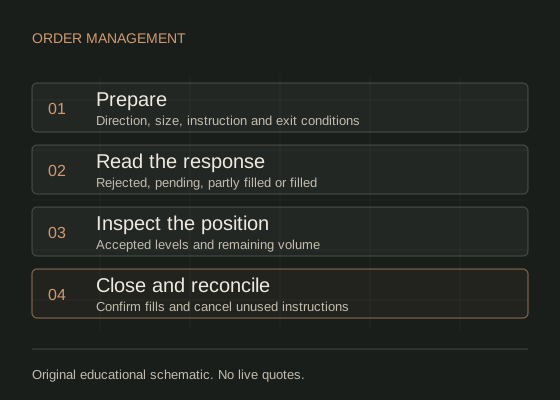
Prepare the instruction before clicking.
Start with the order-types lesson if market, limit, stop and stop-limit instructions are unfamiliar. This walkthrough concerns the operating process, using hypothetical prices and a demo account.
| Field | Record before submission |
|---|---|
| Account and contract | Demo server, account currency, exact symbol, contract size and volume step |
| Direction and volume | Buy or sell; units or lots with the conversion shown |
| Instruction | Market or the precise pending order type; price and expiry where relevant |
| Exit plan | Invalidation level, protective instruction, target and conditions for cancelling the idea |
| Costs and exposure | Price risk, separate charges, margin and other open positions |
Make the rules explicit enough to check afterwards. “Close if the setup fails” leaves room to reinterpret events. A measurable price or time condition creates a record you can compare with the actual decision.
Verify the status after submission.
An order is an instruction; a fill or deal is an execution; a position is the resulting exposure. A request can fail, remain pending or execute in one or more fills. MetaTrader 5: orders, deals, positions and accounting systems describes these distinctions. Read the response and check the activity record before assuming exposure exists.
If the screen freezes or a confirmation is unclear, inspect the order and position lists before sending another request. Repeated clicks can create duplicate exposure. For a partial fill, inspect both the executed size and any remaining instruction; the handling of the remainder depends on the order and broker.
A rejected protective-level change leaves the previous position state relevant. Do not assume a new stop is active merely because you typed its price. Read back the accepted level and the current position volume.
Separate three management actions.
| Action | Purpose | What to confirm |
|---|---|---|
| Cancel pending order | Withdraw an unfilled instruction | Cancellation was accepted; check whether a fill occurred before cancellation. |
| Modify protective level | Request a different stop or target | The accepted level, quote side and remaining position size. |
| Close position | Reduce or remove executed exposure | Filled close size, remaining exposure and any unused pending instructions. |
Widening a stop increases the price distance at risk for an unchanged position. Moving a stop to the entry price does not guarantee a flat net result because charges and execution differences remain. Record any management change with the reason known at that time.
Check whether the account nets positions.
Under a netting system, an opposite trade in the same symbol can reduce, close or reverse the net position depending on size. Under a hedging system, an opposite order can create a separate position instead. Use the platform’s explicit close command on the intended position and inspect the result. MetaTrader 5: executing trades, modification and closing positions documents the distinction for MetaTrader 5.
For example, selling 0.15 lot against a 0.10-lot buy in a netting account can leave a 0.05-lot short. On a hedging account, an ordinary sell request can instead leave both positions open. Neither is equivalent to simply closing the original buy. Account and broker rules must be checked before rehearsing this operation.
Reconcile a hypothetical partial close.
Assume a USD account, 100,000 EUR per lot, a buy of 0.20 lot filled at 1.1002, and no financing. A later partial close sells 0.10 lot at bid 1.1022. The remaining 0.10 lot closes at bid 1.0992. Assume commission of USD 3.50 per lot per side, charged on each filled amount.
| Execution | Filled size | Price P/L | Commission |
|---|---|---|---|
| Open at 1.1002 | 0.20 lot | Not yet realised | USD 0.70 |
| First close at 1.1022 | 0.10 lot | USD 20.00 | USD 0.35 |
| Final close at 1.0992 | 0.10 lot | −USD 10.00 | USD 0.35 |
The price result is 10,000 × (1.1022 − 1.1002) + 10,000 × (1.0992 − 1.1002) = USD 10.00. Total commission is USD 1.40, so the final net result is USD 8.60. The spread is already reflected in the actual bid/ask fills and is not subtracted again.
The first realised gain did not settle the remaining position’s outcome. After the partial close, record the remaining 0.10 lot and its accepted protective orders. Contract steps, minimum remaining volume and close rules vary.
Close the record as well as the position.
Match the entry and exit fills, timestamps, quantities, costs and account-currency result. Check for orphaned pending orders that could create fresh exposure later. Keep rejected and cancelled instructions alongside fills when they explain a decision.
Record planned versus actual size, level and costs in the trading journal. Judge adherence separately from outcome: an unplanned oversized winner is still an execution error, while a loss can follow the written plan.
Common questions.
Does cancelling an order close a trade?
Only an unfilled instruction is cancelled. An executed position needs a closing transaction; inspect both the order list and the position list.
Is a stop at entry risk-free?
No. Commission, financing, conversion and a worse execution price can still produce a loss. Stop instructions do not guarantee their displayed price.
Is an opposite order always a close?
No. The result depends on the accounting system and size. On a hedging account it can create another position; on a netting account an oversized opposite trade can reverse the position.
Sources & assumptions.
Prepared by InsomniCapital. Sources checked on . The workflows, fictional entities, diagrams and numerical examples are original teaching illustrations. They are not reported trades, current quotes or a tested strategy. Product and platform conditions vary.
- MetaTrader 5: orders, deals, positions and accounting systems
- MetaTrader 5: executing trades, modification and closing positions
- CFTC: eight things to know before trading OTC forex
Educational information, not personalised investment advice. Leveraged trading carries a high risk of loss. InsomniCapital has an Axi affiliate relationship and may receive referral compensation. Sources are not endorsements of this guide. Read our risk disclosure and editorial standards.
Lesson 5 checkpoint
Put the reading into practice
Work it through
Write a demo ticket and its intended management rules. After the rehearsal, match every filled amount and charge to the final statement. Explain how you would confirm cancellation and why an opposite order may not close a hedging-account position.
The checkbox records study; answering every checkpoint question correctly records a separate pass. Try the module assessment for a mixed question set. Read the evidence standards for how examples and claims are presented.